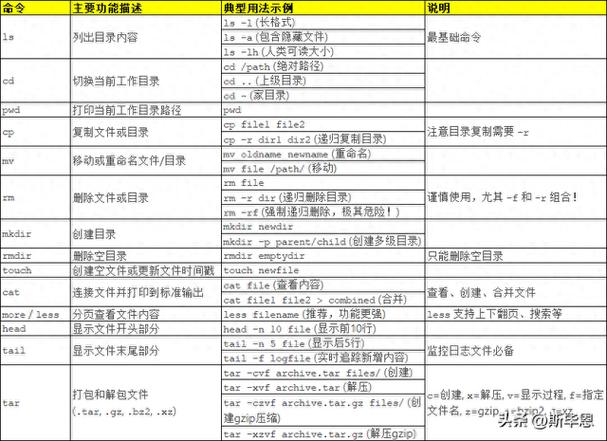
在Linux维护工作中,经常使用ls这个命令,这是最基本的命令,来写几条常用的ls命令。
先来查看一下使用的ls版本
# ls --version ls (GNU coreutils) 8.4 Copyright (C) 2010 Free Software Foundation, Inc. License GPLv3+: GNU GPL version 3 or later . This is free software: you are free to change and redistribute it. There is NO WARRANTY, to the extent permitted by law. Written by Richard M. Stallman and David MacKenzie.
-a :全部的档案,连同隐藏档( 开头为 . 的档案) 一起列出来
# ls -a . .bash_history .bashrc install.log .rnd .viminfo .. .bash_logout .cshrc install.log.syslog .tcshrc anaconda-ks.cfg .bash_profile ic.asp .mysql_history test.sh
-A :全部的档案,连同隐藏档,但不包括 . 与 .. 这两个目录linux 文件操作函数,一起列出来
# ls -A anaconda-ks.cfg .bash_profile ic.asp .mysql_history test.sh .bash_history .bashrc install.log .rnd .viminfo .bash_logout .cshrc install.log.syslog .tcshrc
-f :直接列出结果linux命令,而不进行排序 (ls 预设会以档名排序!)
# ls -f .bash_history install.log anaconda-ks.cfg .tcshrc .bash_profile .mysql_history ic.asp test.sh install.log.syslog .rnd .bashrc .bash_logout . .cshrc .. .viminfo
-i :列出 inode 位置,而非列出档案属性;
# ls -i 131081 anaconda-ks.cfg 131074 install.log 131087 test.sh 131085 ic.asp 131075 install.log.syslog
-l :长数据串行出,包含档案的属性等等数据。
# ls -l total 28 -rw-------. 1 root root 1232 Mar 21 2014 anaconda-ks.cfg -rw-r--r--. 1 root root 218 Mar 27 2014 ic.asp -rw-r--r--. 1 root root 10602 Mar 21 2014 install.log -rw-r--r--. 1 root root 3824 Mar 21 2014 install.log.syslog
-n :列出 UID 与 GID 而非使用者与群组的名称 (UID与GID会在账号管理提到!)
# ls -n total 28 -rw-------. 1 0 0 1232 Mar 21 2014 anaconda-ks.cfg -rw-r--r--. 1 0 0 218 Mar 27 2014 ic.asp -rw-r--r--. 1 0 0 10602 Mar 21 2014 install.log -rw-r--r--. 1 0 0 3824 Mar 21 2014 install.log.syslog -rwxrwxrwx. 1 0 0 71 Mar 22 2014 test.sh
-r :将排序结果反向输出,例如:原本档名由小到大,反向则为由大到小。
# ls -r test.sh install.log.syslog install.log ic.asp anaconda-ks.cfg
-R :连同子目录内容一起列出来
# ls -R .: anaconda-ks.cfg ic.asp install.log install.log.syslog test.sh
–full-time :以完整时间模式 (包含年、月、日、时、分) 输出
# ls --full-time total 28 -rw-------. 1 root root 1232 2014-03-21 11:47:42.036260099 +0800 anaconda-ks.cfg -rw-r--r--. 1 root root 218 2014-03-27 17:14:58.616108512 +0800 ic.asp -rw-r--r--. 1 root root 10602 2014-03-21 11:47:38.997261768 +0800 install.log -rw-r--r--. 1 root root 3824 2014-03-21 11:46:29.032261018 +0800 install.log.syslog -rwxrwxrwx. 1 root root 71 2014-03-22 15:00:12.652133897 +0800 test.sh
file命令cp命令rm命令mv命令touch命令
# touch 2014test 2013test # ll -rw-r--r-- 1 root root 0 10月 6 14:54 2014 2013test -rw-r--r-- 1 root root 0 10月 6 14:54 2014 2014test
如果2012test不存在,则不创建文件
# touch -c 2012test # ll -rw-r--r-- 1 root root 0 10月 6 14:54 2014 2013test -rw-r--r-- 1 root root 0 10月 6 14:54 2014 2014test
cksum命令
经常用于系统迁移时linux 文件操作函数linux压缩命令,在原服务器和迁移后服务器用cksum命令进行文件的正确性比较。
# cksum /etc/hosts 2823562723 184 /etc/hosts
chown命令
文件file1.txt的拥有者为users群体为jessie。
# chown users:jessie file1.txt
将当前目录下的所有文件与子目录的拥有者皆设为users群体的使用者lamport。
# chown -R users:lamport *
chmod命令
将档案 file1.txt 设为所有人皆可读取
# chmod ugo+r file1.txt
或者
# chmod a+r file1.txt
将档案file1.txt与file2.txt 设为该档案拥有者,与其所属同一个群体者可写入,但其他以外的人则不可写入
# chmod ug+w,o-w file1.txt file2.txt
将当前目录下的所有档案与子目录皆设为任何人可读取
# chmod -R a+r *
此外chmod也可以用数字来表示权限如
语法为:chmod abc file
其中a,b,c各为一个数字,分别表示User、Group、及Other的权限。
chattr命令参 数: tar命令zip命令
